Payslip Software for South Africa
Your employee worked the month. Pay day comes. You transfer the money. They ask: "Where is my payslip?" You have nothing to give them. Or you open a Word document, fight with the table, type in the numbers, add them up on a calculator and hope the columns still line up when you save it. Next month, you do it all again.
The BCEA says every employer must give employees a payslip. Not because of paperwork. Because a payslip is proof. Proof that someone works, earns, and can show a bank or a landlord what they take home.
A domestic worker, a shop assistant, a part-time gardener. They all deserve a proper payslip. It should not take you 20 minutes to make one, and for a handful of employees it should not need paid payroll software.
How the free payslip generator works
You open the payslip generator in your browser. Enter the employer and employee details, the pay period, and this month's earnings and deductions. The generator adds up the lines and shows gross pay, total deductions and net pay in a live preview. You download the PDF and send it to your employee on WhatsApp yourself, or print it. A few minutes. Done.
One thing it does not do: work out tax. You type the PAYE and UIF amounts yourself. The generator handles the layout and the addition, not the payroll calculation.
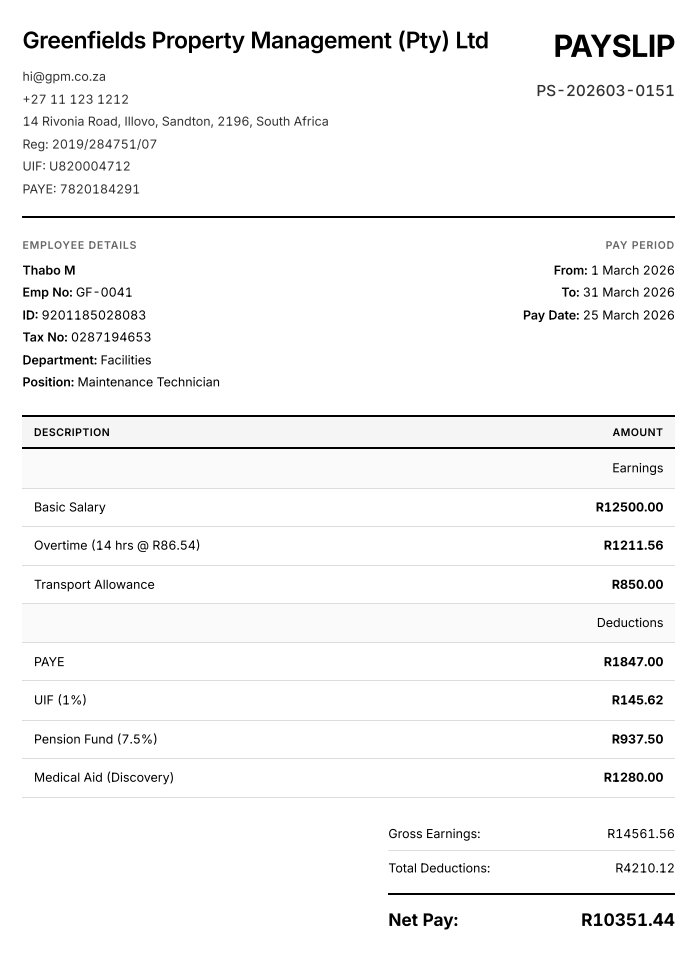
A sample payslip PDF.
How to create one
Enter the employer and employee.
Company name, address and optional UIF reference. Employee name, occupation, ID or employee number, and the pay period.
Enter earnings and deductions.
Basic salary, overtime, allowances. UIF, PAYE, pension, medical aid, or any custom deduction. One line each, with the amount you have worked out.
Download the PDF and send it.
Click Download PDF and choose Save as PDF. Then attach it in the employee's WhatsApp chat as a Document, email it, or print it.
Open the free payslip generator
Type the amounts, download the PDF, send it yourself. No signup, no watermark.
What is on the payslip
The BCEA fields
Employee name and occupation, employer details, pay period, earnings, deductions, net pay. The items Section 33 lists.
Your own earnings and deduction lines
Add as many lines as you need and label them yourself: overtime, Sunday pay, commission, a loan repayment.
Logo and UIF reference
Optional company logo at the top, and a field for your UIF reference number if you have one.
Totals done for you
Gross pay, total deductions and net pay are added up from the lines you enter, in the currency you choose.
Delivery and pricing
Sent on WhatsApp, by you. Save the PDF and attach it in the employee's private chat as a Document. They open WhatsApp and see their payslip. No email to check, no portal, no printer needed. Always send it one-to-one, never in a staff group. More detail in the guide to sending payslips via WhatsApp.
Free, for any number of employees. There is no charge and no per-employee fee. The generator suits employers with a few staff who work out pay by hand. If you have many employees or complex pay, a payroll system that calculates tax will save you time.
Reissuing a payslip. Nothing is stored for you, so keep every PDF you create. If an employee loses theirs, resend the saved file. The BCEA expects employers to keep pay records, so a folder per employee is worth the minute it takes.
The cost of not giving payslips
Your employee has no proof of income. Applying for credit, renting a flat or claiming UIF becomes harder than it should be. You are not meeting your duty under the BCEA. And every month, you spend 20 minutes per employee doing something that should take a few.
Who this is for
An employer with a domestic worker, gardener, or nanny who wants to do things properly.
A small business owner with a few employees and no HR department.
A bookkeeper who needs a clean payslip layout for a small client.
Someone who has been meaning to start giving payslips but never got around to it.
FAQ
Are the payslips BCEA compliant?
The generator has fields for the details Section 33 of the Basic Conditions of Employment Act asks for: employer name and address, employee name and occupation, pay period, earnings, each deduction, and net pay. Whether your payslip is compliant depends on what you enter, so complete every field that applies, including hours and overtime where relevant, and make sure the amounts are correct.
Is wabill a payroll system?
No. The payslip generator does not calculate PAYE or UIF and does not submit anything to SARS. You type the earnings and deduction amounts, it adds them up and produces the payslip PDF. If you need payroll calculations, work them out with your accountant, the SARS tax tables or a payroll system, then enter the results here.
Can I create payslips for domestic workers?
Yes. Domestic workers are entitled to payslips under the BCEA. Enter your details as the employer, the worker's name and occupation, the pay period, the wage and any deductions such as UIF, then download the PDF and send it to their WhatsApp or print it.
How much does it cost?
Nothing. The payslip generator is free, with no signup, no watermark and no per-employee charge. Make as many payslips as you need.
Does it remember my employees for next month?
No. Nothing is saved: the form runs in your browser and is cleared when you refresh the page. Keep last month's PDF for each employee so you can copy the details across, and store every payslip you issue in your own records.
Free to use. No signup. Nothing leaves your browser.