Invoice Template for South African Businesses
Skip the template search. Generate a professional invoice free below, then send the PDF on WhatsApp or email.
Free invoice generator
Add your logo and line items, switch on VAT if you need it, and download a PDF. No signup.
Skip the template
Instead of downloading a Word or Excel template and fighting with the formatting, fill in the free invoice generator. You get a live preview and a clean PDF that is ready to send.
What every South African invoice must include
Whether you use a Word template or the free generator, a professional invoice needs these elements:
- Your business name, address, and contact details
- Your client's name and contact details
- A unique, sequential invoice number (e.g., INV-2026-001)
- The date the invoice is issued
- Clear description of each good or service provided
- Quantity and unit price for each item charged
- Subtotal, VAT (if registered), and total amount due
- Your banking details for EFT payment
- Payment terms and due date (e.g., 'Due within 30 days')
Additional fields for VAT-registered businesses
If your annual turnover exceeds R1 million, you must register for VAT under the Value-Added Tax Act 89 of 1991. Section 20 of that Act requires your invoices to include:
- The words 'Tax Invoice' prominently displayed
- Your VAT registration number
- The recipient's name, address, and VAT number (for invoices over R5,000)
- The price excluding VAT
- The VAT amount (currently 15%)
- The total including VAT
For invoices of R5,000 or less (including VAT), you can issue an abridged tax invoice under Section 20(4). The recipient's details are not required.
Example invoice
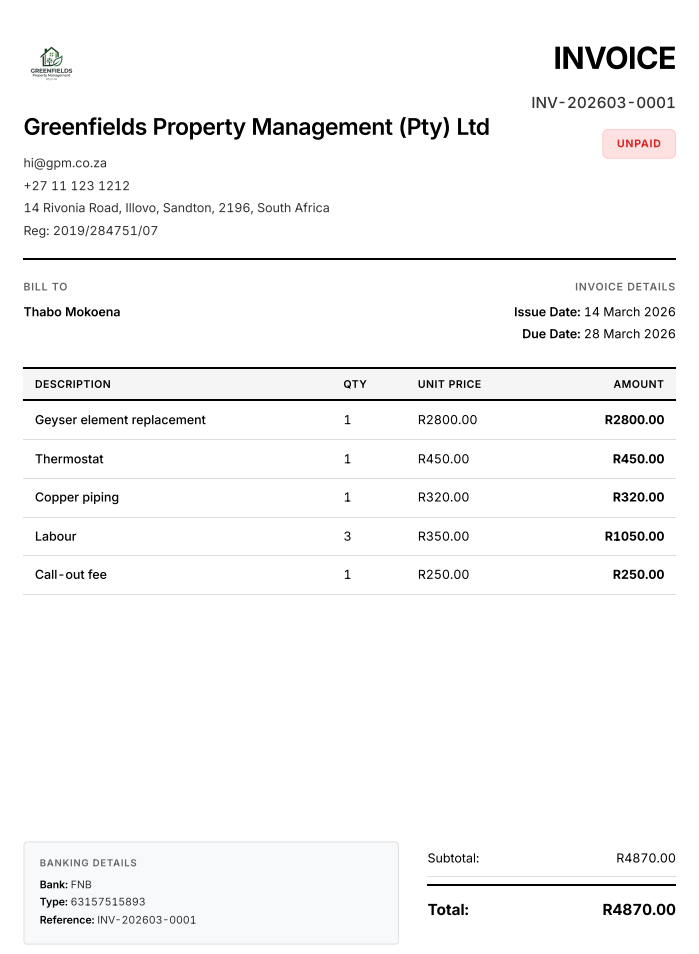
A sample invoice PDF.
Common invoice mistakes
- Missing bank details. This makes it harder for clients to pay you.
- Vague descriptions. Use specific descriptions instead of 'Services rendered'.
- No invoice number. This makes tracking and accounting difficult.
- No due date. Clients don't know when to pay.
- Charging VAT when not registered. This is illegal under the VAT Act.
- Not keeping copies. SARS requires 5 years of records (Section 55, VAT Act).
No more fighting with Word templates
Instead of downloading a template and fixing the layout every time, use the free invoice generator. Here is a worked example: a web designer invoicing Ndaba Properties for a website redesign (R15,000), a logo refresh (R3,500) and SEO setup (R2,500), due in 30 days.
- Your details: business name, contact details, address and banking details. Upload your logo, and add your VAT number only if you are VAT registered.
- Client: Ndaba Properties, with the company address in the client address field.
- Invoice number, date and due date: type the next number in your sequence, set the date to today and the due date 30 days later.
- Line items: three lines with quantity 1, one each for the website redesign, the logo refresh and the SEO setup. The subtotal comes to R21,000.
- VAT: if you are registered, switch VAT on and the generator adds 15% (R3,150) for a total of R24,150. If you are not registered, leave it off and the total stays R21,000.
- Notes: payment terms, for example payment due within 30 days by EFT.
When the preview looks right, click Download PDF and choose Save as PDF in the print dialog. Nothing is stored on wabill and refreshing the page clears the form, so save the PDF to your phone or computer before you close the tab, and keep a copy for your records. To send it, open the chat with your client in WhatsApp, tap attach and choose Document (not Gallery), so the PDF arrives uncompressed and easy to print. If you are VAT registered, use the tax invoice generator instead, which titles the document Tax Invoice.
FAQ
Do I need to download a template?
No. The free invoice generator runs in your browser. Fill in the form, check the live preview and download the PDF. There is no template file to download, no software to install and no signup.
Can I customize the invoice design?
Yes, within a clean standard layout. You can add your logo, business details, banking details and notes, and choose the currency. The PDF has no watermark.
Are the invoices SARS-compliant?
They can be, as long as you enter the right details. If you are VAT registered, use the free tax invoice generator: it titles the document 'Tax Invoice' and shows the amount excluding VAT, the VAT amount and the total. Section 20 of the VAT Act 89 of 1991 also requires your VAT number and, for invoices over R5,000, the recipient's name, address and VAT number, so make sure you fill those in.
What is the difference between a tax invoice and a regular invoice?
A tax invoice is required by the VAT Act when the supplier is VAT registered. It must include specific fields like the VAT number, amounts excluding and including VAT. A regular invoice is for non-VAT-registered businesses and doesn't break out VAT.
Free to use. No signup. Nothing leaves your browser.