From quote to invoice
A quote is your offer. Once the client accepts it, the next document is an invoice with the same line items and its own number. Put the quote number in the invoice notes so the two are easy to match.
What to include on a South African quote
A professional quote should include these elements to protect both you and your client:
- Your business name, address, and contact details
- Client name and contact details
- Unique quote number (e.g., QUO-2026-001)
- Date issued
- Validity period (e.g., 'Valid for 30 days')
- Detailed description of goods or services
- Quantity and unit price for each item
- Subtotal, VAT (if registered), and total
- Terms and conditions
- Your bank details (for when the client accepts)
Quote vs proforma invoice vs estimate
Quote / Quotation
A firm price offer for specific goods or services. Once accepted, it forms a binding contract. Most common in South African business.
Proforma Invoice
Same as a quote but formatted like an invoice. Common in international trade and government tenders. Used when the buyer needs a document for internal approval.
Estimate
An approximate cost, not a fixed price. Useful when the scope of work may change (e.g., repairs where you discover additional issues).
Example quote
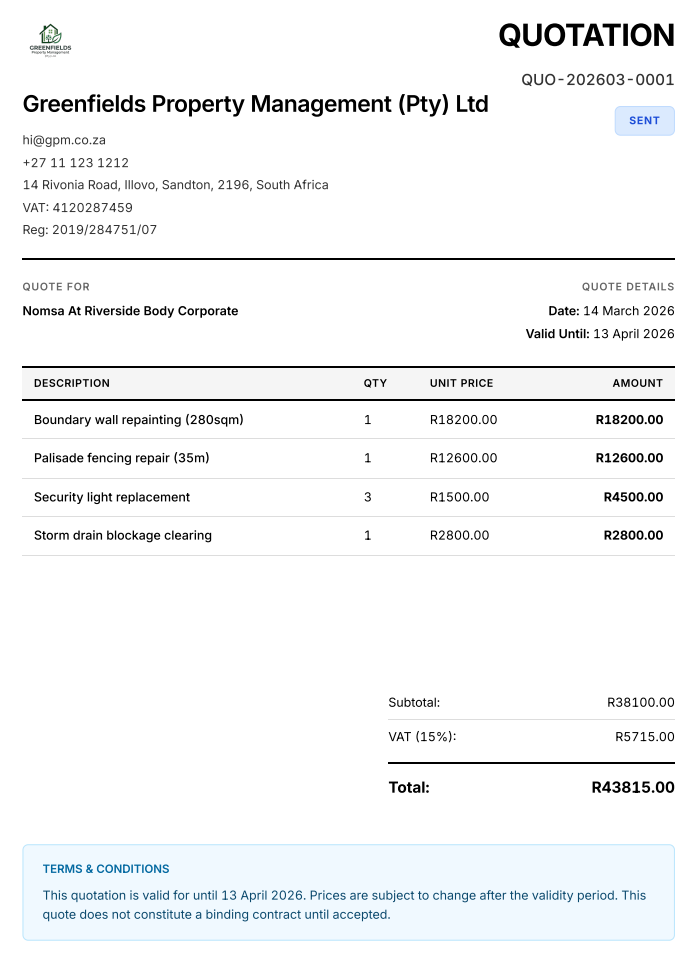
A sample quote PDF.
VAT on quotes
If you are registered for VAT (compulsory if turnover exceeds R1 million per year under the Value-Added Tax Act 89 of 1991), your quotes must show the VAT breakdown. Even though a quote is not a tax invoice, it sets the client's expectation. Always show:
- Amount excluding VAT
- VAT at 15%
- Total including VAT
- Your VAT registration number
Tips for better quotes
- Be specific. Vague descriptions lead to disputes
- State what's excluded. This prevents scope creep
- Include a validity period. Material costs change
- Add payment terms: deposit, milestones, or payment on completion
- Number your quotes for tracking and reference
Create quotes and send them on WhatsApp
You do not need a Word or Excel template. Use the generator at the top of this page:
- Enter your business details and upload your logo if you have one
- Enter the client's name, a quote number, the date, and a valid-until date
- Add a line for each item or service with quantity and unit price
- Switch on VAT if you are registered and add your VAT number
- Use the notes and terms field for exclusions, deposit, and payment terms
- Check the preview, click Download PDF, and choose 'Save as PDF'
- Send the PDF to your client on WhatsApp as a document, or by email
QUOTATION #QUO-2026-021
Quote for: Ndlovu Trading
Valid until: 30 days from issue
Website design: R12,000.00
Logo design: R3,500.00
Hosting (12 months): R1,200.00
SEO setup: R2,500.00
TOTAL: R19,200.00
Terms: 50% deposit (R9,600.00) to start, balance on completion.
The generator does not store your quote, so save the PDF and note the quote number you used. When the client accepts, use the free invoice generator to bill the deposit or the full amount, and mention the quote number in the invoice notes.
FAQ
What is the difference between a quote and an invoice?
A quote is an estimate provided before work begins. It is not a demand for payment. An invoice is issued after the work is done and requests payment. When a client accepts your quote, you issue an invoice with the same line items and its own invoice number.
How long should a quote be valid for?
In South Africa, 30 days is standard for most industries. Construction and building quotes often state 14 days due to fluctuating material costs. Always state the validity period clearly.
Must a quote include VAT?
If you're VAT registered, yes. Section 20 of the VAT Act 89 of 1991 requires you to reflect VAT on all tax-related documents. Show the amount excluding VAT, the VAT amount, and the total including VAT.
Is a quote legally binding?
A quote becomes a binding agreement when the client accepts it. Under South African contract law, acceptance of a quote creates a valid contract. This is why it's important to include clear terms and a validity period.
Can I send a quote on WhatsApp?
Yes. Fill in the free quote generator on this page, click Download PDF, and save the quote as a PDF. Then open your client's WhatsApp chat, tap attach, choose Document, and send the file. A PDF sent as a document stays sharp and is easy for the client to forward or print.
Free to use. No signup. Nothing leaves your browser.